from dotenv import load_dotenv
load_dotenv()

import time
import pandas as pd11 Workflows first
Chaining, routing, parallelizing, and refining model calls
Every system so far has made one model call to do one thing. Real tasks are bigger than one call: triage a ticket and draft a reply, answer a question that spans several documents, enforce a format the model keeps getting wrong. The reflex is to reach for an “agent” that works the whole thing out on its own, but the reflex is worth resisting, because most multi-step work is better handled by a workflow, where you decide the control flow and the model fills in the steps, than by an agent, where the model decides the control flow too. Workflows are more predictable, cheaper, and easier to debug. This chapter covers the five workflow patterns that handle the large majority of real tasks, following the framing in Anthropic’s 2024 essay on building effective agents. Chapter 12 covers the case where you genuinely need an agent. On the Chapter 1 lifecycle map, this is the orchestrate stage, where a single call grows into a workflow or an agent.
NoteSetup for this chapter
Run in the gaba-core environment with an OPENROUTER_API_KEY. We reuse gaba.llm, gaba.rag, and the ticket data from earlier chapters.
The five patterns differ only in the structure of their control flow, and the structures are easier to compare in one picture than across five sections. Here they are at a glance; the rest of the chapter builds each one.
flowchart TB
    subgraph p1["1 Prompt chaining"]
        direction LR
        i1([input]) --> s1["call A"] --> s2["call B"] --> o1([output])
    end
    subgraph p2["2 Routing"]
        direction LR
        i2([input]) --> r["classifier"]
        r --> h1["handler A"] --> o2([output])
        r --> h2["handler B"] --> o2
    end
    subgraph p3["3 Parallelization"]
        direction LR
        i3([input]) --> w1["call"] --> o3([output])
        i3 --> w2["call"] --> o3
        i3 --> w3["call"] --> o3
    end
    subgraph p4["4 Orchestrator-workers"]
        direction LR
        i4([input]) --> orch["orchestrator<br/>splits the task"]
        orch --> wk1["worker"] --> syn["synthesizer"]
        orch --> wk2["worker"] --> syn
        syn --> o4([output])
    end
    subgraph p5["5 Evaluator-optimizer"]
        direction LR
        i5([input]) --> g["generator"] --> e["evaluator"]
        e -- "fails: critique" --> g
        e -- "passes" --> o5([output])
    end
    p1 ~~~ p2 ~~~ p3 ~~~ p4 ~~~ p5
11.1 Pattern 1: Prompt chaining
The simplest workflow is to run steps in sequence, with the output of each step fed into the next. You chain when a task has natural stages and doing them in one prompt would muddle them. Here we triage a ticket into structured fields, then use those fields to draft a reply, so that two focused calls carry the work that one overloaded call would muddle.
from typing import Literal
from pydantic import BaseModel, Field
from gaba.llm import call_llm, call_structured

class TicketInfo(BaseModel):
    category: str = Field(description="the ticket category")
    urgency: Literal["low", "medium", "high"]

ticket = "I was charged twice for my order and need the duplicate refunded today."

# Step 1: extract structure.
info = call_structured(ticket, TicketInfo).data
# Step 2: draft a reply that uses the extracted structure.
reply = call_llm(
    f"Ticket: {ticket}\nCategory: {info.category}\nUrgency: {info.urgency}\n"
    "Write a brief, professional reply.",
    system="You are a support agent. Be concise and helpful. "
           "Refund processing takes 3-5 business days.",
)
print(f"category={info.category}, urgency={info.urgency}\n")
print(reply.text)
category=billing, urgency=high
We've received your request regarding the duplicate charge. We are processing your refund, which typically takes 3-5 business days to reflect in your account.
WarningPitfall: the model claims actions it cannot take
Read the draft closely: it tends to tell the customer the refund has been processed. Nothing in this workflow touched a payment system; the model wrote a plausible support reply, and plausible support replies announce actions. A drafted claim about an action the system never performed is exactly the failure that turns support automation into a liability, which is why a sent reply needs either a human review step or a system that actually performs (and verifies) the action before claiming it. Part IX returns to these guardrails.
Each step is simple and testable on its own. If the reply is wrong, you can see whether the extraction was wrong or the drafting was, which you cannot do when both happen inside one opaque call.
11.2 Pattern 2: Routing
Routing classifies the input, then sends it to a handler specialized for that class. A refund needs different handling from a technical bug, and a single all-purpose prompt does both worse than two focused ones. We classify the ticket, then dispatch to a category-specific instruction.
HANDLERS = {
    "refund": "You handle refunds. Confirm the amount and state the 3-5 business day timeline.",
    "technical": "You handle technical issues. Ask for one diagnostic detail and suggest one fix.",
    "other": "You are a general support agent. Acknowledge and route to the right team.",
}

def classify_route(ticket: str) -> str:
    """One cheap call: which handler should take this ticket?"""
    kind = call_llm(
        ticket,
        system="Classify this ticket as exactly one of: refund, technical, other. One word.",
    ).text.strip().lower()
    return kind if kind in HANDLERS else "other"

def route(ticket: str) -> str:
    """Classify the ticket into a handler, then answer with that handler's prompt."""
    kind = classify_route(ticket)
    reply = call_llm(ticket, system=HANDLERS[kind])
    return kind, reply.text

for t in ["I want my money back for the broken item.",
          "The app crashes every time I upload a file."]:
    kind, reply = route(t)
    print(f"[{kind}] {reply[:90]}\n")
[refund] I understand you'd like a refund for the broken item.
I can confirm that your refund for
[technical] Okay, I can help with that.
**Diagnostic Detail:** What is the **file size** of the file
The router is one cheap classification call, and each handler stays simple because it only handles one kind of thing. Adding a new category means adding a handler, with no need to rewrite one sprawling prompt.
A router is also the first place in this chapter where we can attach a number, whereas the earlier patterns rested on a single trusted example. The whole pattern stands or falls on the classification step, so we measure it.
Metric: routing accuracy, the fraction of tickets sent to the right handler.
Test set: fifteen tickets from the running corpus, with the right handler derived from their gold categories by a mapping we wrote by hand.
Baseline: the lazy router that sends every ticket to the busiest handler.
from concurrent.futures import ThreadPoolExecutor  # run the calls at once; Pattern 3 explains why
from gaba.data import load_tickets, load_ticket_labels

labeled = load_tickets().merge(load_ticket_labels(), on="ticket_id").head(15)

# Our hand-written gold mapping from the corpus's fine categories to the three
# handlers: anything that ends at the money-back-or-replace desk is "refund",
# anything about systems or access is "technical", the rest is "other".
TO_ROUTE = {"refund_request": "refund", "billing_problem": "refund",
            "damaged_item": "refund", "wrong_item": "refund",
            "technical_issue": "technical", "account_access": "technical"}
labeled["gold_route"] = [TO_ROUTE.get(c, "other") for c in labeled["category"]]

with ThreadPoolExecutor(max_workers=8) as pool:
    labeled["routed"] = list(pool.map(classify_route, labeled["text"]))

accuracy = (labeled["routed"] == labeled["gold_route"]).mean()
majority = labeled["gold_route"].value_counts(normalize=True).max()
print(f"routing accuracy:  {accuracy:.0%} on {len(labeled)} tickets")
print(f"busiest-handler baseline: {majority:.0%}\n")
print(pd.crosstab(labeled["gold_route"], labeled["routed"],
                  rownames=["gold"], colnames=["routed"]))
routing accuracy: 73% on 15 tickets
busiest-handler baseline: 60%
routed other refund technical
gold
other 6 2 1
refund 0 4 1
technical 0 0 1Read the accuracy against the baseline first; the gap between them is what the one classification call contributes. Then read the breakdown, because it shows where the errors sit: misroutes concentrate in tickets that straddle two crude classes, a damaged item that reads like a complaint, an access problem phrased as a refund demand. A three-class router is only as good as the fit between its classes and the actual traffic, and when one cell of that table fills up, the fix is usually a new handler for that kind of ticket, because a cleverer prompt cannot repair a class boundary that fails to fit the traffic.
WarningDon’t outsource this
An assistant can write classify_route and the crosstab in a minute. Deciding whether a filled off-diagonal cell reflects a genuine misroute or an ambiguous ticket that legitimately belongs to two classes at once, and choosing whether the fix is a new handler or a redrawn class boundary, is the judgment this section exists to teach. Hand that reading to the tool and you end up with a router that looks measured but was never actually understood.
11.3 Pattern 3: Parallelization
When subtasks are independent, nothing requires them to run in sequence, so we run them all at once. The model calls spend almost all their time waiting on the network, so running them concurrently costs almost nothing in additional resources while saving most of the elapsed time. As an example, we classify a batch of tickets sequentially and then in parallel, timing both.
from concurrent.futures import ThreadPoolExecutor
from gaba.data import load_tickets

tickets = load_tickets().head(8)["text"].tolist()

def classify(t: str) -> str:
    return call_llm(t, system="Reply with one word: the customer's sentiment.").text.strip()

start = time.perf_counter()
[classify(t) for t in tickets]
sequential = time.perf_counter() - start

start = time.perf_counter()
with ThreadPoolExecutor(max_workers=8) as pool:
    list(pool.map(classify, tickets))
parallel = time.perf_counter() - start

print(f"sequential: {sequential:.1f}s")
print(f"parallel:   {parallel:.1f}s   ({sequential / parallel:.1f}x faster)")
sequential: 3.3s
parallel: 1.0s (3.3x faster)import matplotlib.pyplot as plt
fig, ax = plt.subplots(figsize=(5, 3.2))
bars = ax.bar(["sequential", "parallel"], [sequential, parallel],
color=["#9a9a9a", "#0969da"], width=0.55)
ax.bar_label(bars, labels=[f"{sequential:.1f}s", f"{parallel:.1f}s"], padding=3)
ax.set_ylabel("seconds for 8 classifications")
ax.spines[["top", "right"]].set_visible(False)
plt.tight_layout()
plt.show()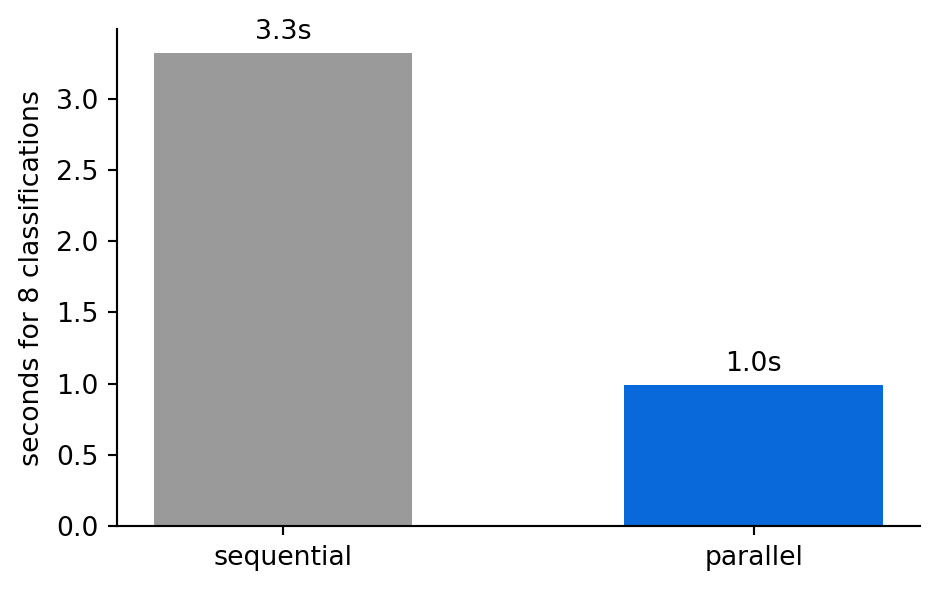
The work and cost are the same, but the wall-clock time is a fraction of what it was. Parallelization also covers a second case: running the same input through several prompts at once and combining the results. For example, we can ask three times and take the majority vote, or score an answer along several dimensions simultaneously.
This majority-vote trick is called self-consistency, and it takes four lines now that the pool is set up. We take one ambiguous ticket, classify it three times at temperature 1.0 so the runs can disagree, and let the votes settle it.
from collections import Counter

ambiguous = "The app charged me twice when it crashed during checkout."

def one_vote(_):
    return call_llm(
        ambiguous,
        system="Classify this ticket as exactly one of: refund, technical, other. One word.",
        temperature=1.0,
    ).text.strip().lower()

with ThreadPoolExecutor(max_workers=8) as pool:
    votes = list(pool.map(one_vote, range(3)))
print("votes:", votes, "-> majority:", Counter(votes).most_common(1)[0][0])
votes: ['refund', 'refund', 'refund'] -> majority: refundThe ticket really is both a billing problem and a crash, so single runs at this temperature can return either label, and the vote turns that instability into one defensible answer. The price is exactly what it looks like: three calls where one would do, which is worth paying on ambiguous, high-stakes inputs and waste on easy ones.
11.4 Pattern 4: Orchestrator-workers
Some questions cannot be answered from one retrieval because they have parts. “Compare the cloud and automotive businesses” is really two questions joined. The orchestrator pattern uses one model call to break the task into subtasks, runs a worker on each, and uses a final call to synthesize. Because the subtasks are not known in advance, the orchestrator decides them from the input.
from gaba.rag import rag_answer

class SubQuestions(BaseModel):
    questions: list[str] = Field(description="2-4 focused sub-questions")

compound = "Compare how the cloud business and the automotive business performed."

# Orchestrator: split the task, telling it what data the workers can reach.
plan = call_structured(
    "Break this into focused sub-questions, each answerable from the 2023 "
    "annual reports of eight companies: Amazon, Tesla, Bank of America, "
        "Hormel Foods, Black Hills, Ambac, Air Transport Services, and Park Hotels "
    f"(annual revenue, segment results, margins):\n{compound}",
    SubQuestions,
).data
print("sub-questions:")
for q in plan.questions:
    print("  -", q)

# Workers: answer each independently (these could run in parallel).
findings = [rag_answer(q)[0] for q in plan.questions]

# Synthesizer: combine into one answer.
synthesis = call_llm(
    "Combine these findings into one comparison:\n\n"
    + "\n\n".join(f"Q: {q}\nA: {a}" for q, a in zip(plan.questions, findings)),
    system="Write a concise, balanced comparison grounded in the findings.",
)
print("\n--- synthesis ---")
print(synthesis.text[:400])
sub-questions:
- What was the annual revenue generated by Amazon's AWS segment in 2023, and how did this compare to its overall annual revenue?
- What was the annual revenue generated by Tesla's automotive segment in 2023, and what were the gross margins for this segment?
- How did the operating margins of Amazon's cloud business (AWS) compare to the gross margins of Tesla's automotive business in 2023?
- Which of the eight companies reported the highest percentage growth in revenue for their respective cloud or automotive segments in 2023?
--- synthesis ---
In 2023, Amazon's AWS segment generated \$91 billion in revenue, representing a significant portion of Amazon's total revenue of \$575 billion for the year. Information regarding Tesla's automotive segment revenue, gross margins, or growth rates, as well as comparisons to AWS operating margins or growth, was not available in the provided context.
One detail in that orchestrator prompt is easy to miss: it tells the model what data exists, the eight companies, the year, the kinds of figures. Left to imagine the corpus, an orchestrator happily decomposes the query into sub-questions about market share or the latest quarter, the workers dutifully report “not found” for each, and the synthesis becomes a list of gaps. Telling the orchestrator what the workers can actually answer is part of the pattern itself, however much it looks like an incidental tweak.
TipWith an AI coding tool
This is the pattern your coding assistant runs on. When Claude Code receives “refactor this module,” it acts as an orchestrator: it breaks the task into edits, dispatches each as a worker step, and synthesizes the result. Seeing the pattern here is why, in Chapter 12, you will be able to reason about what such a tool is doing, whereas without it the tool can only be treated as inscrutable.
11.5 Pattern 5: Evaluator-optimizer
The final pattern is a loop: generate a candidate, evaluate it against a criterion, and if it fails, feed the critique back and try again. This is how you reliably satisfy a constraint that a single call keeps violating. The evaluator can be a simple check or, for subjective quality, a large language model (LLM) judge like the one from Chapter 9. Here the criterion is a tight word limit, which a first draft often overshoots.
LIMIT = 6
context = "AWS segment sales grew 13% year over year to $90.8 billion in 2023."

def evaluate(text: str) -> tuple[bool, str]:
    n = len(text.split())
    return n <= LIMIT, f"{n} words; the limit is {LIMIT}"

draft = call_llm(f"In one sentence, summarize: {context}", system="Summarize.").text.strip()
for attempt in range(1, 4):
    ok, feedback = evaluate(draft)
    print(f"attempt {attempt}: {'PASS' if ok else 'FAIL'} ({feedback}) :: {draft}")
    if ok:
        break
    draft = call_llm(
        f"Summarize in {LIMIT} words or fewer: {context}\n"
        f"Prior attempt: {draft}\nProblem: {feedback}. Make it shorter.",
        system="Revise to satisfy the constraint.",
    ).text.strip()
attempt 1: FAIL (14 words; the limit is 6) :: AWS segment sales increased by 13% year over year, reaching $90.8 billion in 2023.
attempt 2: PASS (6 words; the limit is 6) :: AWS sales: $90.8B, up 13% 2023.A single call gives you the model’s first guess and no guarantee, while the loop gives you a guarantee at the cost of an extra call or two when the first attempt misses; the pattern trades extra calls for reliability.
11.6 Workflows versus agents
Every pattern here has one thing in common: we wrote the control flow. The order of the chain, the router’s classes, the orchestrator’s decision to decompose the task, and the loop’s stopping condition are all fixed in our code. The model fills in the steps without choosing them, which is what makes a workflow predictable and cheap to debug.
The five patterns also line up cleanly on cost and latency, which is the comparison you make when picking one.
| pattern | calls per task | latency profile | what it provides | reach for it when |
|---|---|---|---|---|
| 1 chaining | one per stage | sum of the stages | testable stages, focused prompts | the task has natural stages one prompt would muddle |
| 2 routing | classifier + one handler | two calls in sequence | specialized handling per kind of input | inputs fall into kinds that need different treatment |
| 3 parallelization | one per subtask, at once | roughly the slowest call | wall-clock speed, or votes on one input | subtasks are independent of each other |
| 4 orchestrator-workers | plan + workers + synthesis | three sequential stages | decomposition decided from the input | the subtasks are not known until the input arrives |
| 5 evaluator-optimizer | one + one per revision | grows with each retry | a constraint you can rely on | a single call keeps violating a checkable rule |
An agent removes that fixed structure and lets the model decide the control flow at run time: which tool to call next, whether to loop again, when it is done. That flexibility is occasionally essential and far more often excessive. The rule worth carrying into the next chapter is to reach for the simplest pattern that accomplishes the task: start with a single call, escalate to a workflow when the task has parts, and escalate to an agent only when you cannot predict the steps in advance. In practice, many systems labeled “agent” are actually workflows, the same point Anthropic’s essay makes.
11.7 Evaluation: measuring the workflow against the single call
A workflow costs more than a single call, so it has to justify the difference. To do this, we measure the workflow and a single call on the thing the workflow was supposed to improve. For the evaluator-optimizer, that thing is constraint satisfaction.
Metric: how often the output satisfies the word limit.
Test set: five short summarization requests.
Baseline: a single call with the limit stated in the prompt.
contexts = [
    "Amazon net sales increased 11% to $574.8 billion in 2023, with AWS contributing $90.8 billion.",
    "Tesla delivered 1.81 million vehicles in 2023, a 38% increase, while revenue reached $96.8 billion.",
    "Hormel Foods reported net sales of $12.1 billion across retail, foodservice, and international segments.",
    "Black Hills operating revenues were $2.6 billion from its electric and gas utility operations.",
    "Operating income rose to $36.9 billion while free cash flow improved to $32.2 billion year over year.",
]

def single_call(ctx):
    r = call_llm(f"Summarize in {LIMIT} words or fewer: {ctx}", system="Summarize.")
    return r.text.strip(), r.cost_usd

def loop(ctx):
    draft, cost = single_call(ctx)
    for _ in range(3):
        ok, fb = evaluate(draft)
        if ok:
            break
        r = call_llm(f"Summarize in {LIMIT} words or fewer: {ctx}\nPrior: {draft}\n{fb}. Shorter.",
                     system="Revise.")
        draft, cost = r.text.strip(), cost + r.cost_usd
    return draft, cost

from gaba.eval import llm_judge

# Generate once, then score both metrics: did it meet the limit, and is the
# shorter summary still faithful to the facts? Track what each system spends.
single_out, single_cost = zip(*[single_call(c) for c in contexts])
loop_out, loop_cost = zip(*[loop(c) for c in contexts])

def faithful(summaries):
    return sum(llm_judge("Summarize the key facts", s, c).faithful
               for s, c in zip(summaries, contexts))

import pandas as pd
n = len(contexts)
pd.DataFrame({
    "system": ["single call", "evaluator-optimizer"],
    "within limit": [f"{sum(evaluate(s)[0] for s in single_out)}/{n}",
                     f"{sum(evaluate(s)[0] for s in loop_out)}/{n}"],
    "faithful": [f"{faithful(single_out)}/{n}", f"{faithful(loop_out)}/{n}"],
    "cost $": [f"{sum(single_cost):.5f}", f"{sum(loop_cost):.5f}"],
})| system | within limit | faithful | cost $ | |
|---|---|---|---|---|
| 0 | single call | 3/5 | 5/5 | 0.00005 |
| 1 | evaluator-optimizer | 5/5 | 5/5 | 0.00008 |
Read the within limit column first. The loop can never score below the single call there: it starts from the single call’s output and only revises when that output overshoots, so it fixes every miss it can. The single call has no such guarantee, and against this tight limit it overshoots where the loop does not. The size of that gap decides whether the loop justifies its extra calls: a large gap does, while a gap of zero means the single call was already enough and the loop is waste. The cost $ column prices that decision: the loop spends more than the single call exactly in proportion to how many drafts needed revising, so the same table shows what the reliability gain cost.
But that column alone would be a foregone conclusion, which is why the table has a second one. By construction the loop can only match or beat the single call on the constraint, so the within limit column measures only whether the loop enforces the limit, leaving open whether enforcing it cost anything. The faithful column is the check that could expose a cost: a loop that hits the limit by dropping a key figure would show a lower faithfulness score. Here it does not, the revised summaries stay faithful, so on this task the loop achieved constraint compliance at no cost in faithfulness. Push the limit tighter and it would eventually start trading facts for brevity, and only the second column would show it. This is the discipline from Chapter 9 applied to control flow: measure a workflow on a metric that could expose its failure, because the metric it is built to win can reveal nothing.
The economics of the loop come down to two numbers: how often a first attempt passes, and how many revisions you allow. If a first attempt passes with probability \(p\) and we permit \(R\) revisions, the chance the loop ends in a pass is \(1-(1-p)^{R+1}\), and the expected number of generation calls is the pass chance divided by \(p\). The arithmetic has a practical consequence: even a coin-flip first attempt becomes a near-guarantee after two revisions, and the expected cost stays well under the worst case because most tasks never use their retries.
TipCost: every step is a call
A workflow’s cost is the sum of its steps. Chaining doubles the calls of a single step; an orchestrator-worker over four sub-questions is six calls or more; an evaluator-optimizer loop is one call plus one per revision. The added reliability and quality are often worth that multiple, but they are never free, and on self-hosted hardware, where no per-token dollars are charged, the multiple appears as latency and throughput: each step is another pass through the model, so a six-call workflow serves a sixth as many tasks on the same hardware. Count the calls a workflow makes before you deploy it, and make sure the quality it adds is worth the multiple on the bill.
11.8 Exercises
11.8.1 Conceptual questions
The defining difference between a workflow and an agent is that:
- a workflow makes fewer model calls per task than an agent ever does
- an agent can call external tools, while a workflow is limited to plain model calls
- we write a workflow’s control flow; an agent’s model decides it at run time
- a workflow always runs its steps one after another and never in parallel
Prompt chaining with two focused calls beats one overloaded call mainly because:
- each step stays simple, and a bad reply tells you which step went wrong
- two short prompts cost fewer total tokens than one long combined prompt
- the second call can draw on a larger context window than the first
- splitting the work prevents the model from hallucinating in either step
Parallelizing independent model calls saves most of the elapsed time because:
- the provider batches simultaneous requests into a single cheaper call
- concurrent calls share a cached copy of the prompt between threads
- each worker thread receives its own faster copy of the model
- the calls mostly sit waiting on the network, so the waits overlap
The orchestrator-worker pattern is the right choice when:
- the steps are known in advance but too slow to run one at a time
- the subtasks depend on the input and a model call must decide them
- the output has to combine several formats that a single prompt cannot produce
- the task needs more context than one call’s window can hold
What does the evaluator-optimizer loop trade away for its reliability?
- factual accuracy, since every revision drifts further from the source
- the ability to use structured outputs inside the generation step
- a context window large enough to hold every earlier attempt
- extra model calls whenever a draft fails and needs revision
The chapter’s evaluation scores the loop on faithfulness as well as the word limit. Why is the second metric needed?
- the loop is built to win on the limit, so only faithfulness could expose a cost, such as a dropped fact
- faithfulness is the one metric where the single-call baseline is guaranteed to come out ahead
- a word limit is a hard constraint, so it cannot be checked automatically and needs a judge
- averaging two metrics gives a steadier score than either alone on a five-item test set
In the routing pattern, what does the chapter’s code do when the classifier produces a label with no matching handler?
- it raises an error and asks the customer to restate the ticket
- it retries the classification call until the model returns a valid label
- it falls back to the general “other” handler written for that case
- it sends the ticket to every handler and merges their replies
An orchestrator-worker workflow that decomposes a question into four sub-questions makes about how many model calls?
- two: one call to plan the sub-questions and one to answer them together
- six: one to plan, one worker per sub-question, and one to synthesize
- four: the plan and synthesis are free because the workers run in parallel
- one: the decomposition happens inside a single call’s own reasoning
11.8.2 Build lab
Turn the routing example into a three-step workflow: route the ticket, draft a reply with the matched handler, then run an evaluator-optimizer loop that checks the reply mentions the customer’s specific issue and revises if it does not. Measure how often the loop had to revise. You may use an assistant for the supporting code; you define the evaluator’s criterion.
11.8.3 Evaluate lab
Take the orchestrator-worker answer to the compound comparison question and a single-call answer to the same question (no decomposition). Judge both for completeness with the Chapter 9 judge or your own rubric. Report whether decomposition produced a more complete answer, and whether the improvement justified the extra calls.
NoteWhere we go next
Workflows fix the control flow in advance. Chapter 12 moves on to agents, where the model is handed a set of tools and decides for itself which to call and when to stop. We build a small agent, give it tools, and connect it to the outside world through the Model Context Protocol, the same standard your coding assistant uses, so that by the end you could extend one of those tools yourself.