from dotenv import load_dotenv
load_dotenv()

from gaba import DATA_DIR

pdf_path = DATA_DIR / "filings" / "amazon.pdf"
print("document:", pdf_path.name)
document: amazon.pdfGetting clean text, and then clean data, out of documents
Almost every interesting business document arrives as a PDF (Portable Document Format, a fixed-layout page description): an annual report, an earnings release, a contract, an invoice. Before a model can read one, we have to recover the text, which a PDF does not store in a convenient form: it describes where ink goes on a page, whereas what the words mean, and even what order to read them in, goes unrecorded. This chapter extracts the text of a real earnings release two ways, shows why one method serves the steps that follow better, and then establishes that clean text is not the same as clean data. Recovering reliable numbers from a document is a job for the structured outputs we built in Chapter 3. This Part is the prepare-the-data stage of the Chapter 1 lifecycle, getting documents into a form the system can use.
The filings our desk answers questions about arrive as PDFs, and nothing downstream works until we recover clean text from them. This is the first link in the document side of the system, feeding the embeddings and retrieval that follow.
Run in the gaba-core environment. The sample document is assets/data/filings/amazon.pdf, Amazon’s fourth-quarter 2024 earnings release; a second, fictional filing, assets/data/filings/brightwell.pdf, joins in the last section. You need an OPENROUTER_API_KEY for the extraction-to-facts sections.
from dotenv import load_dotenv
load_dotenv()
from gaba import DATA_DIR
pdf_path = DATA_DIR / "filings" / "amazon.pdf"
print("document:", pdf_path.name)document: amazon.pdf| Tool | Why we use it here | Alternatives | Trade-off |
|---|---|---|---|
| PyMuPDF | fast, local extraction of a PDF’s existing text, with no API call | pdfplumber, pypdf | speed against losing layout |
| pymupdf4llm | layout-aware extraction that emits Markdown, so structure survives for chunking | Docling, Marker, hosted services like Amazon Textract | structure preserved against still-imperfect tables |
Part II closes, in Chapter 7, with the document stack as a whole; the tooling-landscape appendix lists the current options.
The simplest extraction reads the text off each page in the order the PDF stores it. This is what gaba.pdf.extract_raw does, wrapping PyMuPDF.
from gaba.pdf import extract_raw

raw = extract_raw(pdf_path)
print(f"{len(raw):,} characters extracted")
print("\n--- first 400 characters ---")
print(raw[:400])
36,142 characters extracted
--- first 400 characters ---
AMAZON.COM ANNOUNCES FOURTH QUARTER RESULTS
SEATTLE—(BUSINESS WIRE) February 6, 2025—Amazon.com, Inc. (NASDAQ: AMZN) today announced financial results
for its fourth quarter ended December 31, 2024.
Fourth Quarter 2024
•
Net sales increased 10% to $187.8 billion in the fourth quarter, compared with $170.0 billion in fourth quarter 2023.
Excluding the $0.9 billion unfavorable impact from year-oveFor the opening prose, that is fine: the headline numbers come out readable. The trouble starts where the document has structure. An earnings release is full of financial statements laid out as columns of numbers, and raw extraction flattens them into a stream. First, here is the income statement as it actually appears on the page, rendered straight from the PDF:
import numpy as np
import pymupdf
import matplotlib.pyplot as plt

# Render just the income-statement region of the page that holds it. The
# rectangle was found by inspecting the page; any clearly tabular region works.
doc = pymupdf.open(pdf_path)
statement_page = doc[5]
region = pymupdf.Rect(40, 85, 575, 325)
pix = statement_page.get_pixmap(clip=region, dpi=150)

img = np.frombuffer(pix.samples, dtype=np.uint8).reshape(pix.height, pix.width, pix.n)
fig, ax = plt.subplots(figsize=(8, 3.4))
ax.imshow(img)
ax.axis("off")
plt.tight_layout()
plt.show()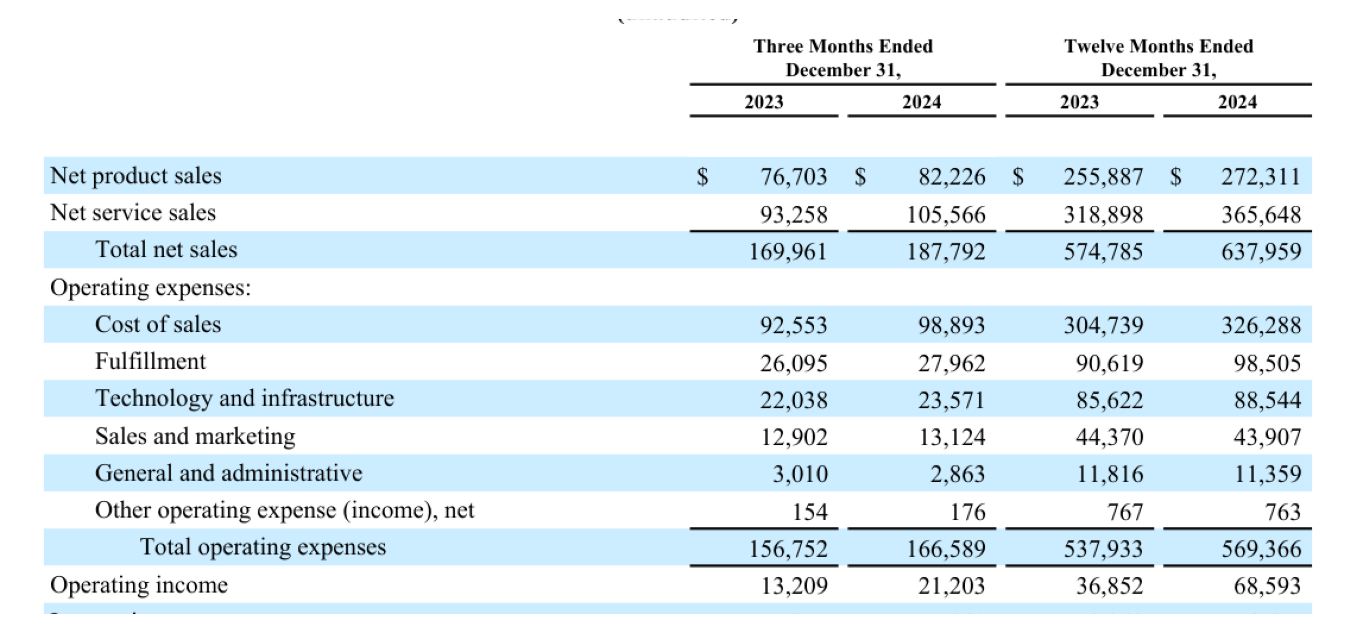
And here is the same region as raw extraction sees it:
# Look at the same region in the extracted text stream.
i = raw.find("Operating expenses")
print(raw[i:i + 500] if i != -1 else raw[6000:6500])
Operating expenses:
Cost of sales
92,553
98,893
304,739
326,288
Fulfillment
26,095
27,962
90,619
98,505
Technology and infrastructure
22,038
23,571
85,622
88,544
Sales and marketing
12,902
13,124
44,370
43,907
General and administrative
3,010
2,863
11,816
11,359
Other operating expense (income), net
154
176
767
763
Total operating expenses
156,752
166,589
537,933
569,366
Operating income
13,209
21,203
36,852
68,593
Interest The problem is immediately apparent: the labels and numbers that belonged together in neat rows and columns are now interleaved in a single stream, so that which number goes with which label is no longer obvious from the text alone. Although a model handed this stream can often still reconstruct the relationships, we have made its task harder by discarding the layout.
A better extractor understands page layout and emits Markdown, so the document’s formatting survives: key terms stay bold, highlight lists stay lists, and section labels stay set apart. This is gaba.pdf.extract, wrapping pymupdf4llm.
from gaba.pdf import extract

md = extract(pdf_path)
print(f"{len(md):,} characters of markdown")

# Count the structure markdown recovered, then show the financial highlights
# rendered as a bulleted list instead of a flat run of text.
bold_spans = md.count("**")
bullets = sum(1 for line in md.split("\n") if line.strip().startswith("-"))
print(f"{bold_spans} bold spans and {bullets} bullet points recovered\n")

i = md.find("Net sales")
print(md[i - 25:i + 320])
35,671 characters of markdown
246 bold spans and 57 bullet points recovered
h Quarter 2024_
- **Net sales** increased 10% to $187.8 billion in the fourth quarter, compared with $170.0 billion in fourth quarter 2023.
Excluding the $0.9 billion unfavorable impact from year-over-year changes in foreign exchange rates throughout the
quarter, net sales increased 11% compared with fourth quarter 2023.
- NorthCompare that to the same content in the raw stream above. The highlights are now a bulleted list with the key terms in bold, where the raw stream ran them together as sentences. This short release has no deep heading hierarchy to recover, but a long structured document such as a full annual report would also emerge with its section headings intact. Either way the point is the same: markdown extraction preserves the structure that raw extraction discards, and that structure is exactly what we will use in Chapter 6 to decide where to split a document into chunks. The raw extractor sufficed for prose but failed on structure, and the layout-aware extractor solves exactly the problem the chunking step would otherwise face.
One failure mode deserves a warning before we move on: the scanned PDF. Everything above assumes the PDF carries a text layer. A scanned contract or a faxed invoice is just a stack of page images, and although one might expect garbled text from it, both extractors return an empty string. The 2026 answer is either classic OCR (optical character recognition, which reads text off page images) or, increasingly, sending the page images straight to a vision-language model and asking for the text, which is exactly what Chapter 19 does. Tools like Docling bundle layout analysis and OCR into one extractor for corpora that mix both kinds of document. If an extraction comes back suspiciously empty, check for a missing text layer before blaming the extractor.
We can manufacture a “scanned” copy of our release in three lines, rendering a page to an image and saving it as an image-only PDF.
# Manufacture a scanned-style PDF: one page rendered to pixels, no text layer.
scanned = pymupdf.open()
page_image = doc[0].get_pixmap(dpi=120)
scan_page = scanned.new_page(width=doc[0].rect.width, height=doc[0].rect.height)
scan_page.insert_image(scan_page.rect, pixmap=page_image)
scan_path = DATA_DIR / "cache" / "amazon_scanned.pdf"
scanned.save(scan_path)

print(f"characters extracted from the scanned copy: {len(extract_raw(scan_path).strip())}")
characters extracted from the scanned copy: 0The count is zero: the page is pixel-for-pixel identical to a reader’s eye, but there are no characters left to recover. The two failures have different signatures and different fixes: garbled text means a layout problem, while an empty string means a missing text layer.
It is tempting to think a good extractor solves the problem, but it does not. Even Markdown extraction does not perfectly reconstruct every financial table in this document. Some emerge as runs of text, because the original PDF positioned the numbers by coordinates, so that no genuine table structure exists for the extractor to recover.
Clean text is still not clean data: if we need the actual net sales figure as a number we can record in a spreadsheet, we have to extract the value and confirm that we recovered the correct one. This is precisely the problem that structured outputs solved in Chapter 3. We describe the facts we want as a schema and then let the model fill it from the document text, with validation guaranteeing the structure.
Drafting the EarningsFacts schema from a sample of the JSON you want is a fast, safe use of an assistant. Paste an example object, ask for the Pydantic model, then read every field: right type, right tolerance, required or optional. The reading is the part that matters.
from pydantic import BaseModel, Field
from gaba.llm import call_structured


class EarningsFacts(BaseModel):
    """The handful of figures we want from the release, as typed data."""

    net_sales_q4_billions: float = Field(
        description="Q4 2024 total net sales, in billions of USD"
    )
    north_america_q4_billions: float = Field(
        description="Q4 2024 North America segment sales, in billions of USD"
    )
    quarter_end: str = Field(description="the date the reported quarter ended")


# Feed the extracted markdown to the model and ask for the typed facts.
result = call_structured(
    prompt="Extract the figures from this earnings release:\n\n" + md[:12000],
    schema=EarningsFacts,
)
facts = result.data
print("net sales (Q4 2024):    $", facts.net_sales_q4_billions, "billion")
print("North America (Q4 2024):$", facts.north_america_q4_billions, "billion")
print("quarter end:            ", facts.quarter_end)
print(f"\ncost: ${result.cost_usd:.5f}")
net sales (Q4 2024): $ 187.8 billion
North America (Q4 2024):$ 115.6 billion
quarter end: 2024-12-31
cost: $0.00035Where a moment ago we had only prose, we now have numbers: typed, validated, and ready for a dataframe. The extractor produced clean text, and the structured-output call produced clean data. These are two different jobs, but a document pipeline needs both.
The principle holds throughout: having built a pipeline, we measure it. Here the question is whether the extracted facts are correct, which we can verify because this is a public document with figures we can read ourselves.
Metric: fraction of target facts recovered correctly.
Test set: three figures from the release whose true values we read by hand: Q4 2024 net sales of $187.8 billion, North America segment sales of $115.6 billion, and a quarter ending December 31, 2024.
Baseline: there is no weaker system to beat here; this establishes whether extraction-plus-structuring is trustworthy on a real document at all.
# Gold values read by hand from the release.
gold = {
    "net_sales": 187.8,
    "north_america": 115.6,
    "quarter_end_year": "2024",
}

checks = {
    "net sales": abs(facts.net_sales_q4_billions - gold["net_sales"]) < 0.5,
    "north america": abs(facts.north_america_q4_billions - gold["north_america"]) < 0.5,
    "quarter end": gold["quarter_end_year"] in facts.quarter_end
    and ("12" in facts.quarter_end or "Dec" in facts.quarter_end),
}

correct = sum(checks.values())
for name, ok in checks.items():
    print(f"  {name:14s}: {'correct' if ok else 'WRONG'}")
print(f"\nrecovered {correct}/{len(checks)} facts correctly")
net sales : correct
north america : correct
quarter end : correct
recovered 3/3 facts correctlyThe pipeline recovers the figures, a small result on one document but exactly the kind of check you should run before trusting any extraction at scale: pick a handful of values you can verify by hand, and confirm the automated pipeline agrees with you. When it does not, the disagreement tells you whether the problem lies in the extraction (the number never emerged from the PDF) or in the structuring (the number was present but the model selected the wrong one). We come back to evaluating extraction systematically, across many documents and fields, in Chapter 9.
flowchart TB
    pdf([PDF]) --> extract["markdown extraction<br/>(pymupdf4llm)"]
    extract --> text["clean text"]
    text --> shaped["schema-guided LLM extraction<br/>(call_structured + EarningsFacts)"]
    shaped --> facts["typed, validated facts"]
    facts --> frame([dataframe])
    facts -.-> verify["spot check against<br/>hand-read gold values"]
    verify -. "value never emerged:<br/>extraction problem" .-> extract
    verify -. "wrong value selected:<br/>structuring problem" .-> shaped
One doubt survives the spot check above. Amazon’s earnings release is among the most-reported documents on the internet, so when the model returns $187.8 billion, we cannot tell whether it read our extracted text or remembered the figure from training. On a public document, reading and remembering produce the same right answer. The way to remove the doubt is a document that cannot be remembered: a fictional company.
assets/data/filings/brightwell.pdf is a three-page annual report for Brightwell Logistics, Inc., a company that does not exist, generated by scripts/make_fictional_filing.py with hand-chosen, deliberately odd figures. Eight gold facts are stored in brightwell_gold.json, written by hand when the document was created. Seven appear in ordinary prose, while the eighth, the FY2025 (fiscal year 2025) fuel cost, appears only inside an income-statement table whose numbers the PDF positions by coordinates, the exact failure pattern we saw in the Amazon statement above.
Metric: fraction of the eight facts recovered correctly.
Test set: brightwell.pdf, with the eight hand-written gold values.
Baseline: the Amazon extraction above, where memorization could be helping; here it cannot.
import json

brightwell_path = DATA_DIR / "filings" / "brightwell.pdf"
bw_md = extract(brightwell_path)
bw_gold = json.loads(
    (DATA_DIR / "filings" / "brightwell_gold.json").read_text()
)["facts"]

print(f"{len(bw_md):,} characters of markdown, {len(bw_gold)} gold facts")
3,095 characters of markdown, 8 gold factsThe pipeline is the one we already built: markdown extraction, then call_structured against a schema. Every field below appears in the document, which is what licenses making all of them required (Chapter 3).
class BrightwellFacts(BaseModel):
    """The eight facts we want from the Brightwell report."""

    founded_year: int = Field(description="the year the company was founded")
    ceo_name: str = Field(description="the chief executive officer's full name")
    revenue_fy2025_millions: float = Field(
        description="FY2025 revenue, in millions of USD")
    operating_income_fy2025_millions: float = Field(
        description="FY2025 operating income, in millions of USD")
    fleet_vans: int = Field(description="delivery vans in the fleet at year end")
    on_time_delivery_pct: float = Field(
        description="full-year on-time delivery rate, in percent")
    employees: int = Field(description="total employees at fiscal year end")
    fuel_costs_fy2025_millions: float = Field(
        description="FY2025 fuel and energy costs, in millions of USD")


bw_result = call_structured(
    prompt="Extract the figures from this annual report:\n\n" + bw_md,
    schema=BrightwellFacts,
)
print(f"cost: ${bw_result.cost_usd:.5f}")
cost: $0.00019Now the fact-by-fact scorecard against the hand-written gold.
import pandas as pd

def matches(extracted, gold_value) -> bool:
    """Numeric facts within a small tolerance; the name by containment."""
    if isinstance(gold_value, float):
        return abs(float(extracted) - gold_value) < 0.05
    if isinstance(gold_value, int):
        return int(extracted) == gold_value
    return str(gold_value).lower() in str(extracted).lower()


rows = []
for fact, gold_value in bw_gold.items():
    extracted = getattr(bw_result.data, fact)
    rows.append({"fact": fact, "gold": gold_value, "extracted": extracted,
                 "correct": matches(extracted, gold_value)})

scorecard = pd.DataFrame(rows)
print(f"recovered {scorecard['correct'].sum()}/{len(scorecard)} facts correctly")
scorecard
recovered 8/8 facts correctly| fact | gold | extracted | correct | |
|---|---|---|---|---|
| 0 | founded_year | 1987 | 1987 | True |
| 1 | ceo_name | Dana Whitfield | Dana Whitfield | True |
| 2 | revenue_fy2025_millions | 847.3 | 847.3 | True |
| 3 | operating_income_fy2025_millions | 63.8 | 63.8 | True |
| 4 | fleet_vans | 412 | 412 | True |
| 5 | on_time_delivery_pct | 96.4 | 96.4 | True |
| 6 | employees | 9184 | 9184 | True |
| 7 | fuel_costs_fy2025_millions | 118.6 | 118.6 | True |
Read the scorecard one row at a time, because the rows are not equally hard. The seven prose facts test ordinary reading, and a model that misses them is failing at the easy part. The fuel-cost row is the planted trap: its value exists nowhere in prose, and the table that holds it came through extraction as separated runs of labels and numbers that the model must re-align by position. If any fact is missed, it will most likely be this one, either missed outright or swapped for its FY2024 neighbor in the next column. And the diagnosis flowchart above applies unchanged: the fuel figure is present in the extracted text, so a wrong value here is a structuring failure, because the extraction stage has already delivered the number. Whichever way a given run turns out, this is the test that the Amazon document could not give us: a score that can only come from reading the document.
An assistant can write the matches function and the scorecard loop above without incident. It cannot read the row that fails and tell you whether the fuel figure was never extracted or was extracted and then misassigned to the wrong column. That diagnosis, extraction failure against structuring failure, is the one this document was built to force, and it depends on you having actually looked at the Brightwell PDF itself, since the pipeline’s output alone cannot support it.
Pulling text from a PDF with PyMuPDF is free and instant, because it is local computation involving no API call. The only cost is the structured-extraction step, a fraction of a cent per document here because the model reads the text once and returns a few numbers. On self-hosted hardware, where no per-token invoice exists, the same step reads as throughput and capacity: one short model call per document sets how many filings an hour the pipeline can process. The per-document cost is the smaller risk. The expensive mistake is skipping the verification, because an extraction pipeline that is silently wrong on one field corrupts every downstream report built on it.
This earnings release is public, so there is nothing to protect. Real document pipelines are usually not: contracts, customer records, and internal filings carry confidential and personal data. The moment you send a document’s text to a third-party model, the same data-residency questions from Chapter 4 and Appendix D apply, and they apply to the whole document, well beyond the fields you asked for.
Raw text extraction struggles most with which part of a document?
Why does Markdown extraction help the chapters that follow, even when the text content is similar?
The chapter argues clean text is not the same as clean data. What turns one into the other?
You build an extraction pipeline over thousands of filings. The cheapest way to catch a silently wrong field is:
The structured extraction returns a net sales figure exactly a thousand times too large. The bug is most likely in:
This chapter’s evaluation has no baseline system. What does it establish instead?
A hand-verified value disagrees with the pipeline, and the number appears nowhere in the extracted text. Which stage failed?
Why do some financial tables emerge as runs of text even from the better Markdown extractor?
Add two more fields to EarningsFacts (for example, operating income and earnings per share), find their true values in the release by hand, and extend the evaluation to score them too. Decide for yourself whether each new field should be a float or a str, and what tolerance counts as correct.
Extract the same facts twice: once from the raw text (extract_raw) and once from the markdown (extract). Score both against the gold values. Report whether the extraction method changed the accuracy on this document, and write one sentence on why the difference was small or large here, given what you saw about how the tables came through.
We can turn a document into clean text and into a few clean facts. But a real corpus is thousands of documents, and we rarely know in advance which one holds the answer to a question. Chapter 6 takes the text we just extracted, splits it into chunks, and turns each chunk into a vector we can search by meaning, the foundation of every retrieval system in the rest of the book.